Lesson 1.5
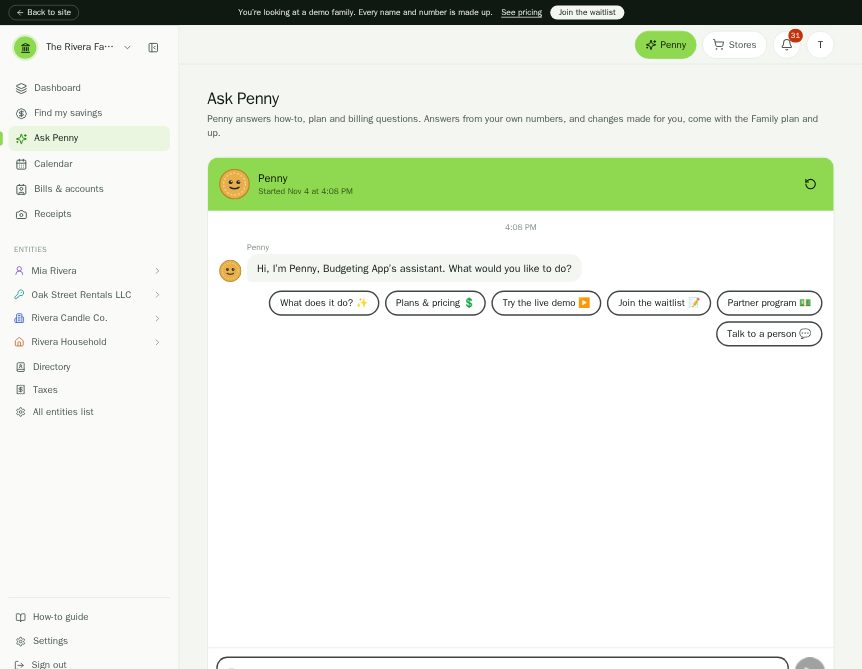
Meet Penny
How to ask money questions in plain words. 4 min read
The big ideaAsk Penny money questions in your own words, and she drafts changes only you can confirm.
Penny is the AI helper inside Stackyard. You don’t need special words or menus. Ask her the way you’d ask a friend who knows your numbers.
What Penny can do
- Answer questions about your own money: “What did we spend on groceries last month?”
- Tell you what’s coming: “What bills are due this week?”
- Make changes you ask for: add a budget, make a category rule or add a reminder.
- Build a report: “profit by month this year for Rivera Candle Co.”
- Help you find your way: “Where do I connect a bank?”
You stay in charge
When you ask Penny to change something, she shows you the change first. Nothing happens until you tap Confirm. Tap Cancel and nothing changes.
Example · The Rivera family
Maria asked, “What did we spend on eating out last month?” Penny answered: $310. Then Maria typed, “Add a $250 budget for eating out.” Penny showed the change, and Maria tapped Confirm.
What Penny can’t do
Penny answers from the accounts and records in the app, so she can’t see an account you haven’t added. She can get things wrong, so check anything important. And she isn’t a financial, tax or legal advisor.
Be specific. “How much did Mia save this year?” gets a better answer than “How are we doing?”
Key notes
- Ask in plain words, the way you’d ask a person.
- Penny drafts changes; nothing happens until you tap Confirm.
- She only knows what’s in the app, and she can be wrong.
- Answers about your numbers and changes are on the Family plan and up.
A steward’s view
Asking for help is part of wisdom. Ask early, while small questions are still small.
Do it in the app
Ask Penny your first question
- 1Open Ask Penny in the sidebar for full screen, or tap the chat bubble in the bottom-right corner of any page.
- 2Ask about your money, like “What bills are due this week?”, or a how-to question like “Where do I connect a bank?”
- 3Ask her to do something, like “add a $40 budget for coffee”. Check the change, then tap Confirm.
Quick quiz
3 questions
Track this automatically in Stackyard
Connect your accounts once and Penny watches for this every time your banks sync.
For education only; not financial, tax or legal advice. Store rules, rates and tax figures change; check the source before you act.