Features · Transactions & rules
Every transaction, handled in a tap
Split it, attach the receipt, note it. Done.
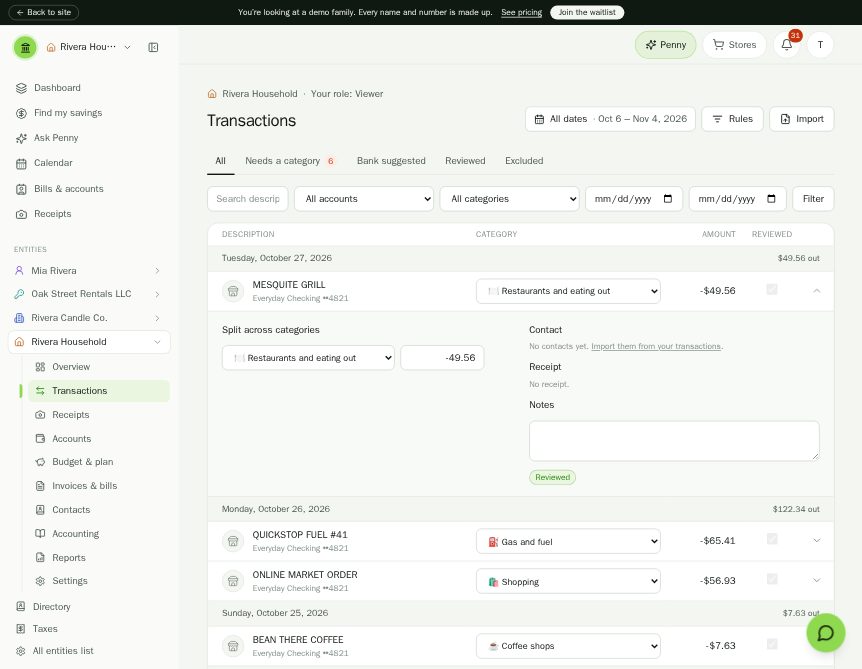
Bank transactions come in on their own and are sorted by your rules and your past choices. Open any one to split it, add a receipt or note, or link a transfer.
Transactions
Split across categories
Receipt attached matched
“Mia’s birthday party” Reviewed
What it does
Split across categories
One Target run becomes groceries, household and party supplies, each counted in the right budget.
Learns as you go
Change a category once and choose to apply it to similar transactions. Rules run first on every new transaction.
Transfers that don’t count as spending
Link both sides of a move between your own accounts so totals stay right.
Review, flag or exclude
Mark things reviewed, flag them for later, or exclude a duplicate from every total without deleting it.
The real screen
From our demo family (every name and number is made up).
See exactly how
- TransactionsEvery purchase, deposit and transfer for an entity, ready to categorize, search and filter.
- The transaction details drop-downEverything you can do with one transaction: split, receipt, notes, contact, transfer, review.
- Category rulesSort new transactions automatically by payee, amount or account.
Questions
Do I have to categorize everything by hand?
No. Rules, your past choices and the bank’s own category sort most transactions. You review and fix the few that need it.
What if my bank can’t connect?
Import a CSV, Excel or OFX/QFX file from your bank. Duplicates are skipped automatically.
More features
Your family’s money, sorted.
Join the waitlist free. Your second month is on us.