Lesson 6.3
Your money calendar
Lining up due dates with paydays. 4 min read
The big ideaBills are easy to pay when the money arrives before they leave.
Many families have enough money for the month but not on the right days. Three big bills land the week before payday, and the account runs dry, even though more money is a few days away.
A money calendar puts paydays and due dates side by side. Once you can see them together, you can line them up.
Example · The Rivera family
They’re paid $3,100 on the 1st and the 15th. The mortgage ($1,850), car payment ($410), electric (about $140) and phones ($95) were all due by the 10th: $2,495 from the first paycheck. Only internet ($60) came out of the second. They asked to move the car payment to the 20th and the phone bill to the 18th. Now it’s $1,990 from the first paycheck and $565 from the second.
Ways to line them up
- Ask to move a due date. Many card companies, lenders and utilities will let you pick a day.
- Split the big one: set aside half of the mortgage or rent from each paycheck.
- Pay early: a bill paid a week early is never late.
- Put paydays on the calendar too, not just bills.
Paid every two weeks? In most years, two months have three paydays. Plan that third check ahead: savings, a sinking fund or extra on a debt.
Key notes
- Put paydays and due dates on one calendar.
- Ask companies to move due dates to just after payday.
- Split a big bill across two paychecks.
- Biweekly pay usually means two three-paycheck months a year.
A steward’s view
Planning ahead turns stress into peace: you see what’s coming and get ready for it.
Do it in the app
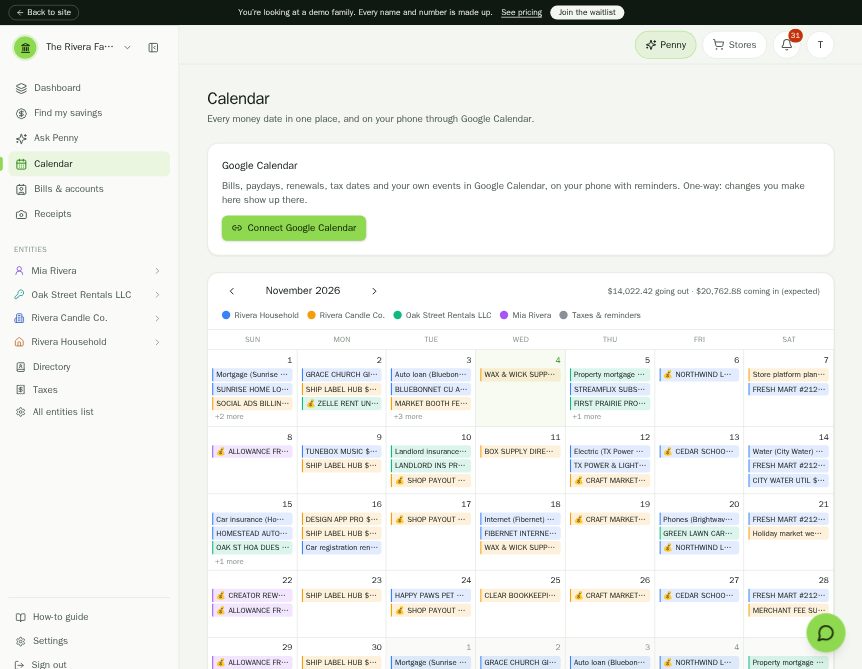
Every money date in one place
- 1Open Calendar. Coming up lists what’s next with amounts; switch between 5 days, 14 days and This month.
- 2Edit what’s on calendar (at the bottom) lists repeating charges and paydays: tap one to change its amount, how often or next date.
- 3Connect Google Calendar or copy the calendar address into Apple Calendar to see it on your phone.
Quick quiz
3 questions
Track this automatically in Stackyard
Connect your accounts once and Penny watches for this every time your banks sync.
For education only; not financial, tax or legal advice. Store rules, rates and tax figures change; check the source before you act.