Finding your way around
How the menus are laid out on a computer and on your phone.
Where it is in the app
Everywhere: the left sidebar on a computer, the bar along the bottom on a phone.
How it works
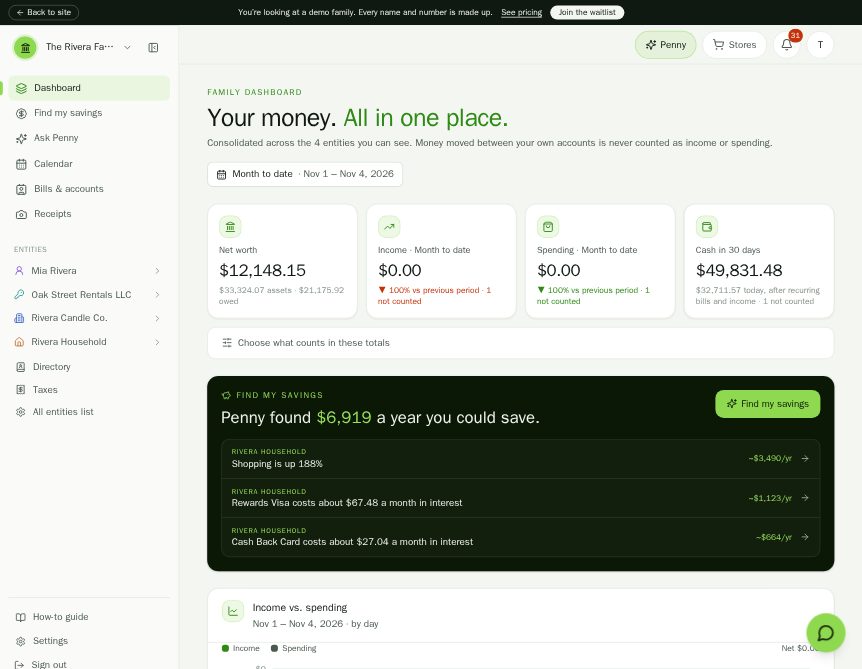
- 1The top of the sidebar is for everything across the whole family: Dashboard, Find my savings, Ask Penny, Calendar, Bills and Receipts. Alerts (the bell) and Store orders (the cart) are at the top right.
- 2Under ENTITIES is each household, business, rental and kid. Click one to open its own menu: Overview, Transactions, Receipts, Accounts (banks, cards and your store connections), Budget & plan, Invoices, Directory (businesses and rentals only), Documents, Accounting, Reports, Taxes and Settings. Kids’ entities leave out Invoices.
- 3Below the entities: Directory (every contact) and Manage entities (edit or archive entities); the + beside it adds another entity.
- 4On the Starter plan the side menu is Dashboard, Ask Penny, Budget and Receipts: Budget sits here and not inside your entity. Calendar, Bills, Find my savings, Store orders and Documents come with the Family plan.
- 5On the free plan, the Learn & tools heading has Learning courses, Printables and Money tools. Paid plans don’t show it in the side menu; open them from the How-to guide (search for them) or ask Penny. They open inside your account, so the side menu stays put.
- 6On the free plan the side menu is Dashboard and Budget, then Learn & tools, then an Upgrade heading with Penny, your AI assistant and Let Penny save you money (each shows what you get) and the Upgrade to automate button. Your one entity has Overview, Transactions, Accounts and Settings. On a phone the bottom bar is Home, Budget, Transactions, Learn and More.
- 7At the very bottom: Settings and Sign out.
- 8On a computer, the top right has Penny, the cart (Store orders), the bell (Alerts) and your initial (Settings). The button next to the entity name at the top of the sidebar folds the sidebar down to icons (hover one for its name); the same spot unfolds it.
- 9On a phone or iPad, the bottom bar has Home, Bills, Calendar, Snap (receipts), Penny and Savings (Find my savings) (on Starter: Home, Budget, Snap, Penny and Transactions; the rest is under your initial at the top). Alerts is the bell and Store orders the cart at the top; tap the entity name at the top to switch entity; your round initial button at the top right opens Settings.
Entities: households, businesses, rentals and kidsThe family DashboardAsk Penny (your AI helper)The guided tour
Want this for your family?
Hold my spot, free