Find my savings
Penny looks through your accounts for money you could keep: subscriptions, bills that went up, fees, double charges, card interest and more.
Where it is in the app
Sidebar → Find my savings (right under Dashboard); Savings on the bottom bar (phone and iPad); and the Find my savings card on the dashboard.
How it works
- 1Credit cards tab: tap Add limit and statement day under a card (both are on your statement). Penny uses them for the Card statement closing alert and the Card balances part of Penny’s Financial Score. Leave the day empty and she estimates it from when you pay.
- 2The first time, the owner sees Turn on Find my savings: switches for Penny’s scan, her questions and alerts, Deals picked from what we buy (on unless you turn it off), price-drop and return reminders, automatic price checks and Penny Shopping Helper notes on store pages. Tapping Turn on Find my savings is agreeing to Penny looking through your transactions and store orders (and picking deals, if that switch is on). Change them any time with the gear next to Find me savings, or Settings → Find my savings.
- 3The dashboard has a Find my savings card too: Penny’s total and her top three finds; tap one to open it.
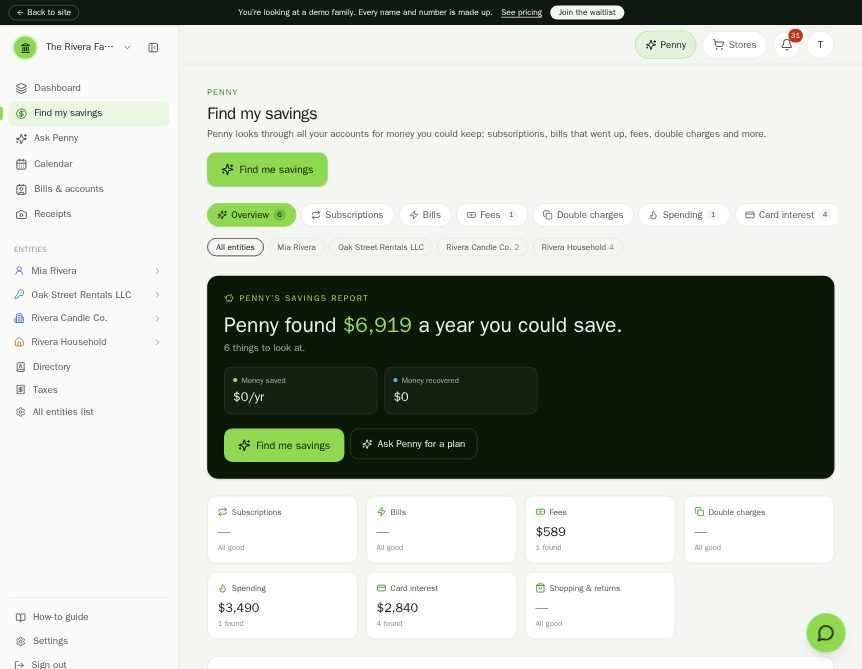
- 4Penny looks at every entity at once. Overview shows the savings report (money saved, possible savings a year, money recovered), Savings by entity (where Penny found money and where you saved it), and everything Penny found, biggest first, each labeled with its entity.
- 5The yearly savings total leaves out Spending ideas (like eating out less); those are your call, so they’re listed but not counted.
- 6Under the report, Invest what you save shows what Penny’s savings could grow into. Drag Invest each month (it starts at Penny’s amount; tap Penny’s find to go back to it) and For how long (1 to 40 years), and pick where it’s invested: Savings account 4%, Bond fund 5%, Balanced fund 6.5% or Stock index fund 8%. The big number, what you put in, the growth and the chart update as you drag. It’s a hypothetical example, not a promise or advice.
- 7Want help investing it? Tap Have Penny find me a financial advisor, pick Investing, Life insurance or Both, check your phone number and state, choose a best time to call and agree to be contacted. A vetted, licensed advisor in our network calls you, usually within one business day. They get only your name, email, phone, state, what you asked for and Penny’s yearly savings amount, never your bank data. Tap Update my request to change it later.
- 8Use Showing: All entities (top right, under the tabs) to pick one entity. On each tab, results are grouped by entity. Shopping pages, Deals, Memberships and Credit score cover the whole account, so they don’t have it.
- 9The Overview tab: Penny’s savings report at the top (how much she found, money saved and recovered, Ask Penny for a plan), then What Penny found (biggest first, mark what you did), By type (tap one to open it), Savings by entity, and at the bottom what your savings could grow into.
- 10Tap Find me savings to have Penny check everything again. She also checks every time your banks sync; when she finds something new, a small “Penny has a quick question” card appears. Tap it and she asks you about it in her chat, with replies to tap: for a bank fee, Write it for me (she drafts the message to your bank); for a price drop, Yes, help me (the steps, your receipt and the store’s link); for a subscription, Help me cancel or Keep it; plus Remind me tomorrow, Show me (opens that finding in Find my savings) or Not for me. You can also just type back. Your answer updates Find my savings. Push notifications and emails ask the same question, and Chat with Penny opens it. She won’t ask about the same kind of thing twice in a row when something else is waiting, and when there’s nothing new she checks in instead, about once a week each: “Want me to check if anything you bought in the last 30 days got cheaper?” (Yes, check now runs the price check right there), “Want me to look for possible double entries?”, or “Is it time to look at all your subscriptions together?”. No thanks rests that one for a month.
- 11Six tabs: Overview, Bills & subscriptions, Shopping (with Discount shopping, Memberships and Deals inside it), Fees & charges (Fees and Double charges), Spending, and Cards & credit (Credit cards and Credit score), plus Across entities when you have more than one. A tab with more than one page shows small tabs under it. Bills & subscriptions (Subscription & bill tracking: every subscription and recurring bill (utilities, phone and internet, insurance, car and loan payments, health care) across your entities, each tagged with its entity’s initials like AE or MH; boxes for the count, a month, a year and what went up or renews soon; a chart of what each entity pays a month; then one folding group per type with bars of recent charges and the usual range. Subscriptions have How to cancel and Not a subscription; bills have Lower this bill, Save as bill and Not recurring. A bill is flagged only when it’s above its whole usual range. Tap an entity above to see only its own), Discount shopping, Fees, Double charges, Spending, Credit cards (interest, then which card earns the most rewards and card offers), Credit score (add your credit report and Penny explains it; see Your credit, explained by Penny) and Across entities.
- 12Late packages (the Late delivery money back card on Shopping → Discount shopping): Penny Shopping Helper (version 1.13 or newer) reads the delivery status on your Amazon orders page each time it syncs and keeps the date Amazon first promised. Late packages are at the top of that card; below them, On the way lists the packages still coming with their delivery-by date and On time so far (and the first promised date if Amazon moved it). Each return window and price drop shows its delivery date (Delivery by…, Delivered… in green with on time or early when it came by the promised day, or Came 3 days late in red). A package that came on or before the promised day is never listed as late. Tap Date changes under a package to see every date Amazon showed for it, the day Penny saw each one, and how many times the promise moved (in orange when it moved later). On the way marks a package Pushed back when Amazon moved its date past the first promise, and Penny always judges late against that first promise. When an order ships in more than one box, Penny Shopping Helper (version 1.16 or newer) reads which products are in each box, and the card shows 1 of 3 boxes here · 2 still coming with each box, what’s in it and its own date (green when it came, red when it’s late). Each box keeps its own first promise, so a box that came is never mixed up with one still coming, and the order counts as late only when one of its boxes is. In Date changes, a delivery for just one box says One box delivered (the rest is still coming). When a package arrives after it (or is more than a day past it), Penny flags it once and writes a polite message asking for a credit: the order number, the promised and actual dates, and about how much you’ve spent with Amazon this year. Tap Penny, get me savings (on the late item): the helper opens Amazon’s help page, shows Penny’s message, and puts it in the chat box when the chat opens (pick the order if the chat asks). You check it and press send; Penny never sends it, cancels anything or changes your account. If they say no, use the follow-up. Then tap I got a credit (it’s added to Money recovered), They said no, or Not worth it. Without the helper, the button copies the message and opens Amazon’s help page.
- 13When Penny asks about a price drop, tap Show it: Find my savings opens on that item, highlighted at the top of the Price drop checker, with See it on Amazon (or the store it’s from) to check today’s price.
- 14Get my money back (on each price drop): Penny shows the route for that store and writes the message for you. Target refunds the difference within 14 days, so she writes the request (order number, both prices, the date and Target’s policy) to paste into Target’s chat or show at Guest Services. Amazon doesn’t promise adjustments, so she writes a polite ask and the return-and-rebuy plan. Walmart doesn’t adjust, so it’s return and rebuy, and she says so plainly when it’s too small to be worth a trip. When it’s cheaper at another store, it’s return it and buy it there. Copy message, open the store’s page, and send it yourself; Penny never contacts the store. Then tap I got it back and enter how much: it’s added to Money recovered on the savings report. Not worth it clears it.
- 15Cards & credit → Credit cards (it used to be Card interest): interest comes first, then Rewards: which card to use. Your credit cards come in from your bank connection on their own. Banks share balances and interest rates but not reward rates, so Penny looks each card up on its bank’s own website (Chase, Amex, Citi, Capital One, Discover and other big banks) and fills in its rewards and annual fee: a rate for groceries, restaurants, gas, travel, streaming, shopping, drugstores, Amazon and everything else, with the cap and dates for rotating 5% categories. Check them and tap Looks right (or fix a rate first). If she can’t confirm a card on the bank’s site, she says so and you add the rates yourself. Penny, check again looks it up again. Penny then shows which card to use for what, what using the best card each time is worth a year on your real spending, and whether a card with a fee earns it back. If a card shows interest charges she says paying it in full comes first. She asks you to confirm each card’s rewards every three months (Still right) and when a rotating category ends.
- 16Rewards missed: once a month (from the 3rd) Penny checks last month’s card purchases. When something went on one card but another of your cards earns more on that kind of spending, she shows it on the Credit cards tab and sends one Card rewards alert when it adds up to $5 or more (“$640 of groceries on your 1% card; your other card earns 3%. Use it for groceries.”). Debit purchases and cards showing interest charges are left out.
- 17Credit cards → Offers you switched on: card apps add cash-back offers each month. Switch them on in the card’s app, then note them here (store, offer, end date). Penny reminds you before one ends and when you shop at that store, and once a month to check for new ones. She never logs in to a card account or switches offers on. Rewards change; check your card’s terms. Not financial advice.
- 18Shopping → Deals: coupons, codes and offers Penny picked because they fit what you already pay for, where you shop or what you buy (like “You have Amazon Prime, so Uber One is free for a year”). Each deal shows the store, what it’s worth, how to use it, when it ends, and “Picked for you because…”. Tap the code to copy it, Get deal to open the store’s page (in a new tab), or Not for me to hide it (Show … deals you hid brings it back). Penny also brings up a new deal as one of her messages, and you can ask her “any deals for me?”. Matching happens inside your account: nothing about you is sent to the store, and deals are never picked by health, pharmacy or pregnancy purchases. Deals marked “We may earn a commission” pay us a small fee if you use them. Turn deals off with the gear → Deals picked from what we buy.
- 19Tap a spending or bill finding (the arrow) to see the transactions behind it: each month’s total, and who, when and how much for the month that went up, each one opening that transaction.
- 20Tap a possible double charge (the arrow) to see both charges side by side: date, amount and account, links to open each one, and how to tell a real double charge from two purchases.
- 21For each finding: I did it (enter what it saved), the helpful link (like How to cancel or Debt payoff plan), or Ask Penny (for steps or a call script). More has the rest: It’s correct (Penny stops flagging that bill, subscription or merchant, and only brings it back if the amount goes higher), Not for me and Dismiss. Undo puts it back.
- 22On Fees, Spending and Credit cards, entities with something to do come first. The ones with nothing to do share one line at the bottom (Nothing to do for …); tap it to see their details.
- 23Discount shopping: three cards side by side at the top (stacked on a phone): Price drop checker, Return windows and Late delivery money back. Price drop checker: Penny watches everything you bought in the last 14 days ($3 and up) while you can still return it or get a price adjustment, and re-checks each purchase every 2 days. She checks every listing of the same product and size at that store (not just the one you bought), and the cheapest way to buy it at Amazon, Walmart or Target, including bigger packs and bulk listings, compared per item. A price only counts when the listing is the same size as yours (a razor with 4 refills isn’t the 1-cartridge one). When another store or a bigger pack is cheapest, the card shows Cheapest: with the store, price and price each, and a link (tap Penny, check for price drops, or turn on automatic price checks with the gear: she then looks for new purchases once a day). Target refunds the difference within 14 days, so she tells you the date to bring your receipt by; for Amazon and Walmart she shows the last day to return it and buy it again. Mark it Got it back or Not worth it.
- 24Discount shopping → Return windows: everything over $20 still returnable, with the last day (about) from each store’s policy. Tap I returned it (Penny watches for the refund) or Keeping it. With reminders on, once a week Penny asks if you’d like a reminder (“You have a couple of items with a return window closing soon”), without naming products in the note. It’s one question for all your entities: Yes, show me which opens this list, and No, I’m keeping them marks every item that’s closing as kept so she stops asking about them.
- 25Notes on store pages: with “Notes from Penny Shopping Helper” on (the gear on Find my savings), Penny Shopping Helper (version 1.11.6 or newer) shows a small note on Amazon (any Amazon address, including us.amazon.com and Amazon’s sites in other countries), Target and Walmart product, cart and checkout pages when you bought the item before: “You got this 17 days ago”, what you paid (and how many, when you bought more than one), how often you bought it and your best price. Tap “Penny, find a better deal” and she checks the same store for a bigger pack or a lower price per item (US stores only, since other countries’ prices aren’t in dollars; each deal shows what it saves on the number you usually buy, says when a price is a Subscribe & Save price, and has a See it on the store button, a plain link we earn nothing from); if you buy it often and the page offers Subscribe & Save, the note says how much it takes off. Only product names and prices are sent; the page and your cart are never changed. Past buys include your store orders and the item lines on receipts you scanned. TikTok Shop (helper 1.14 or newer): in the helper menu, tap Turn on next to TikTok Shop and the same note shows on TikTok Shop product pages.
- 26Seen for less (Shopping → Discount shopping, below the three cards): things you bought (store orders and receipt lines) that Penny Shopping Helper saw for less on an Amazon, Walmart, Target or TikTok Shop product page in the last three weeks, the same size and at least $1 less, with what you paid, the lower price, the store, the day it was seen and See it on the store. The prices come from Penny’s shared price list: each helper sends the product name, price and page address with no name or account attached. Turn off Share prices I see in the helper menu to stop sending yours.
- 27Shopping → Memberships: Amazon Prime, Walmart+ and Target Circle 360 for the last 12 months, with what each cost, how often you ordered and the delivery fees you paid. Tap Penny, check the price to compare with today’s price on the store’s page.
- 28Every block on Find my savings opens and closes with the arrow next to its title. Penny’s findings start open; the rest start closed so the page stays short (on Discount shopping, the three cards and your purchase list are always open). Each block remembers how you left it.
- 29Find it cheaper: on store items over $5 (Other shopping, items still in their return window, Store orders, and the items under an Amazon charge in Transactions), tap Find it cheaper. Penny looks at the product photo and name and checks big US stores (Walmart, Target, Costco, Sam’s Club, Best Buy, Home Depot, Lowe’s, CVS, Walgreens, Chewy and more, plus other shops that show the same photo) for the same product and size, new. In about 20 seconds you see each store’s price, how much you’d save, and a See it link; or You paid a good price. Penny checks free sources first (her price list from Penny Shopping Helper users, and store catalogs like Best Buy and eBay); when those answer, the check is free and says so. Only otherwise does she search the web, which uses shopping lookups. Prices can change, so check the store page before you buy. Some store links may earn us a commission; that never changes what Penny shows. If the item is still in its return window, buying it for less and returning the first one can get you the difference.
- 30Shopping credits: each plan includes shopping lookups every month (they reset on the 1st). The line at the top of Discount shopping shows how many are left. Find it cheaper uses about 3; looking up something any family checked in the last 3 days is free. Free checks (from Penny’s price list or store catalogs) don’t use any. When they run out, the account owner can tap Get credits to buy a pack (Family plans and up, paid once, credits don’t expire); extra credits are used only after the month’s lookups.
- 31Discount shopping → Your store purchases: below the cards, every store purchase from the last 12 months in one list (not split by entity; each item shows its entity’s initials, and the entity buttons at the top narrow it to one). Two tabs: Things you buy often (bought in two or more orders) and Other shopping (everything else, newest first). Search box to find anything. Under Things you buy often, tap Penny, find it cheaper next time and she checks Amazon, Walmart and Target (about 20 seconds) for the same thing or a better pack. Under Other shopping, tap Find it cheaper (see below). Ask Penny opens her chat with ideas like What could I buy in bulk? or Where do I spend the most?, or type your own question.
- 32Discount shopping → Things you buy often: each item shows a 12-month price line (up or down), its price per unit (when the pack size is in the name) and buttons to look for a bigger pack on Amazon or the same thing at Walmart and Target. Tap Penny, check prices: she searches Amazon, Walmart and Target (about 20 seconds) for the same item, multipacks and equal store brands, shows each price and pack size, and what switching would save per buy and per year (compared per unit). More ideas gives search suggestions without prices.
- 33Credit cards → each credit card with a balance shows the balance transfer math: the fee, the monthly payment that clears it during a 0% period, and what you’d save (or that it isn’t worth it). Tap Penny, find balance transfer cards to see current offers from card issuers’ own sites (about 30 seconds), each with what it would save on your balance. This is not financial advice; Penny only presents options. Check the terms on the issuer’s page before applying.
- 34Returned something you bought? In the Return windows card tap I returned it; Penny watches for the refund and tells you if it doesn’t show up in two weeks.
Want this for your family?
Hold my spot, free