Lesson 1.3
Your family’s money map
Households, kids, businesses and rentals each need their own books. 5 min read
The big ideaGive each part of your family’s money its own books, then look at them all together.
Many families have more than one “money world.” There’s the household. Maybe a side business, a rental property, or a child with their own savings.
When all of that runs through one set of numbers, it blurs. You can’t tell if the business makes money, what the rental costs, or how much is really the kids’.
Four kinds of books
- Household: the family’s everyday money, like groceries, the mortgage and the electric bill.
- Business: a side hustle or company. It needs its own income, costs and profit for taxes (often Schedule C).
- Rental: a property you rent out. Rent, repairs and depreciation are tracked per property (Schedule E).
- Kids: a child’s own savings, allowance and goals, so the money is clearly theirs.
Example · The Rivera family
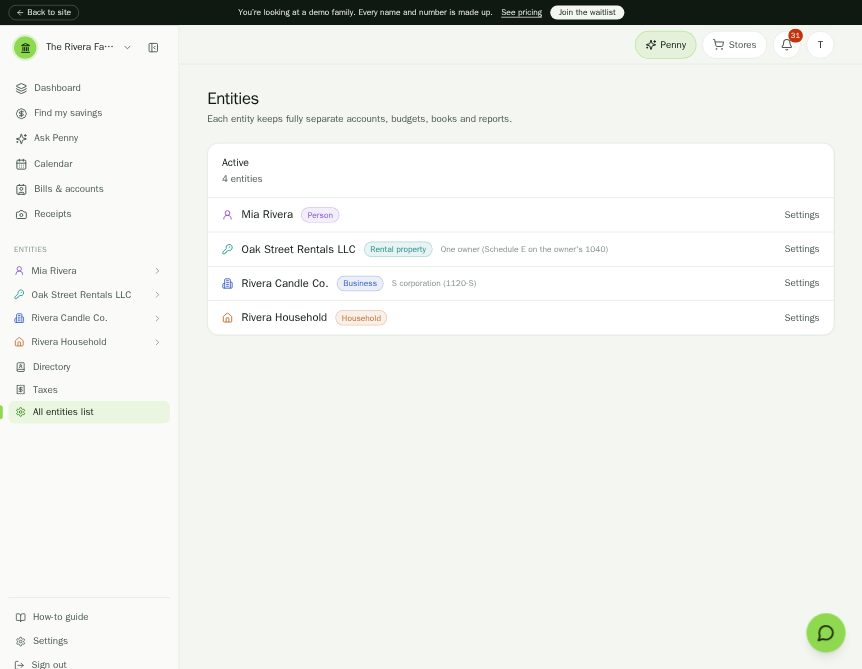
The Riveras have four: Rivera Household, Rivera Candle Co. (Maria’s business), Oak Street Rentals LLC (their rental) and Mia (their daughter). In March the candle business made $2,400 in profit. Maria paid herself $1,500 of it as an owner draw into the household and left the rest in the business.
Moving money between them
Money will move between your books. Record it for what it is: an owner draw (business to you), an owner contribution (you to the business), a loan or a gift. Then both sides stay right and nothing is counted twice.
Separate books don’t mean a separate life. You still want one view of the whole family: total cash, total debt and what’s coming up.
Keep business money in its own bank account. It makes tax time faster and shows clearly whether the business is really profitable.
Key notes
- Household, business, rental and kids each get their own books.
- Separate books make taxes and decisions clearer.
- Record moves between them as owner draws, contributions, loans or gifts.
- Look at the whole family together, too.
A steward’s view
Each household, child, business and rental is something you’ve been trusted with. Separate books help you care for each one well.
Go deeper in Faith and money: Stewards, not ownersDo it in the app
Set up your entities
- 1Open All entities list and choose Add an entity. Pick Household, Business, Rental or Person (a child or family member), and give it a name.
- 2Switch between entities from the sidebar. Each has its own menu: Overview, Transactions, Accounts, Budget & plan and more.
- 3Open the Dashboard to see every entity’s money rolled up into one screen, and click any entity card to jump into it.
Quick quiz
3 questions
Go deeper
- Small Time Operator, Bernard KamoroffPlain-English bookkeeping and taxes for a small business.
Track this automatically in Stackyard
Connect your accounts once and Penny watches for this every time your banks sync.
For education only; not financial, tax or legal advice. Store rules, rates and tax figures change; check the source before you act.